






Turn company files into a presentation. A source behind every number.

Deck from company files is a DFIRST skill that builds a presentation out of your own documents in the Data Room or a connected Drive. Firsty, the DFIRST agent, finds the right files, lists each fact with where it came from, and shows you a slide-by-slide plan before writing. You get an editable deck in your brand's colours and fonts, plus its PDF.

  • Every number comes from one of your files
  • The deck has exactly the number of slides you asked for
  • No placeholder text anywhere
Deck from company filesYour draft stays on this device
Try an example
Start with Firsty

Join the waitlist to finish. Your draft stays on this device, and Firsty starts on it as soon as your access starts.

Examples. What you ask, what you get back.

A 4-slide case study on our NOVA campaign for Thursday's pitch, from the NOVA folder in our Data Room.

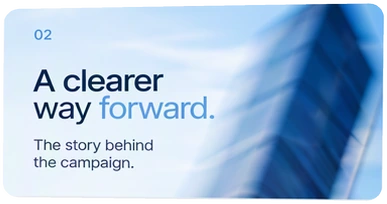
Four slides in NOVA's blue, built from the campaign folder. The plan for the four was approved before any slide was written, and the PDF came with the editable deck.
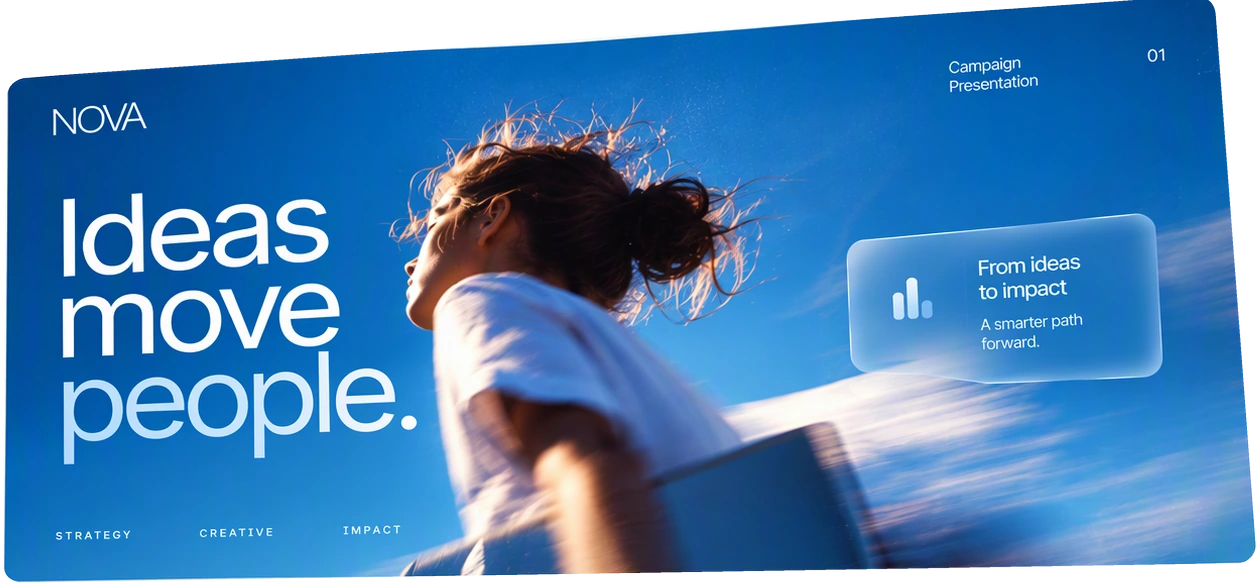
NOVA cover slide: Ideas move people, with a runner in motion
Slide 02: A clearer way forward, the story behind the campaign
Slide 03: Visuals that work, creative direction and examples
Slide 04: Built for what's next, roadmap and opportunities

A 10-slide board update from the files in our Data Room: Q3 sales, the summer campaign and the Lime launch.

Three of the ten slides, in ZESTA's orange. Each number on them comes from a Data Room file that is named at the foot of the slide.

01Q3 sales

Cans sold in Spain and Portugal, up from 1.5 million in Q2.

1.9 millionq3-sales-report.xlsx, Summary
02Summer campaign

Click-through rate on the Squeeze the day ads, June to August.

2.4%summer-campaign-results.pdf, p. 3
03Lime launch

Share of Q3 sales in its first full quarter.

18%q3-sales-report.xlsx, By flavour

An 8-slide pitch for SOL CLUB to a Boston pharmacy chain, from our Q3 results. Show me the numbers first.

The facts table the deck stands on: each number with its file and the slide it goes on. One figure the plan wanted was not in the files, so it is marked missing, not estimated.

TableFacts table: SOL CLUB pitch
FactNumberSource fileSlide
Tubes sold in Q3212,000q3-results.xlsx, Sales2
Repeat buyers within 90 days34%crm-export-sept.csv3
Stores stocking SOL CLUB1,150retail-list-sept.xlsx4
Growth in Massachusetts, Q2 to Q3+22%q3-results.xlsx, Regions5
Sell-through in pharmaciesMissingNot in the files6

Plan approved: 8 slides. A number reaches a slide only from this table.

How it goes. The same steps every time.

Firsty follows the skill’s steps in order and stops where the choice is yours. Nothing paid starts without your yes.

  1. 1

    Firsty finds and reads the right files in your Data Room or Drive

  2. 2

    Firsty collects the facts and numbers, each with its source

  3. 3

    Firsty plans the deck slide by slide

    You approve the plan before any slide is written

  4. 4

    Firsty writes the slides in your brand's colours and fonts

  5. 5

    Firsty checks every number and exports a PDF

Done when

  • Every number comes from one of your files
  • The deck has exactly the number of slides you asked for
  • No placeholder text anywhere
  • A later change touches only the slides you name

At a glance.

What Deck from company files needs from you and what it hands back.

You bring
The topic and goal, the audience and the number of slides. Name the files, or let Firsty search for them.
Defaults
Eight slides for a client's decision-makers, when you do not say otherwise.
Where files come from
Your Data Room or a connected Drive.
You get
The deck on a Presentation card, editable in the presentation editor, plus its PDF, the facts table and the slide plan it was built from.
Changes later
Name the slides to change; the rest stay as they are.

Part of this skill. Each task also has its own page.

When you ask for one of these on its own, Firsty runs it with this skill.

Questions people ask.

About Deck from company files and how it fits the rest of DFIRST.

How do I make a presentation from my documents with AI?

Tell Firsty the topic, the audience and how many slides you need, then point it to the files or let it search your Data Room or Drive. You approve a slide-by-slide plan first. The deck then comes in your brand's look, with each number traced back to a file.

Will it make up numbers to fill a slide?

No. Every number in the deck comes from one of your files, and the facts table shows which file and which slide. When the files do not hold a figure you expected, you see that before writing starts, and can add the file or drop the point.

Can I edit the slides afterwards?

Yes. The deck opens in the presentation editor, where you change text and order yourself. Or ask Firsty for a change and name the slides: only those are rewritten, and every other slide stays exactly as you left it.

Can it read files that are not in DFIRST?

It reads files in your Data Room and in a Drive you have connected under Connections. Files on a laptop or in an email need to be uploaded first. Once they are in, Firsty finds them by search even when you do not name them.

Does the deck use our brand colours and fonts?

Yes. The slides take the colours and fonts from your Brand DNA, so a board update and a client pitch look like they come from the same company, with no placeholder text left on any slide.

See all 27 skills

Ask Firsty for it. It runs the skill with you.

Your request waits on this device until your access starts. DFIRST opens to people on the waitlist first.

Updated